
MyDocs conference video case study
Turning a complex product into a conference story people could understand at a glance
Simplistic Views created a silent-first booth loop for MyDocs, a higher-education technology company, to run at its NACAC 2026 exhibit. Built entirely from MyDocs dashboard screen recordings and custom motion graphics, with no live-action footage, the two-minute 16:9 loop was designed to read from a distance, make sense from any entry point, and give someone walking past a reason to stop.
- NACAC 2026 National College Admission Conference
- Minneapolis, MN Minneapolis Convention Center
- Higher Ed Tech B2B SaaS for admissions and enrollment
- Silent-First 16:9 booth loop, no live-action footage
Watch the MyDocs conference booth video
View the on-screen text and a description of the video
The video has no narration. Below is the on-screen copy in order, with a short description of what appears alongside it. Customer names, portraits, institution marks, and performance figures shown in two sequences were supplied by MyDocs and are summarized rather than reproduced here.
- 0:00
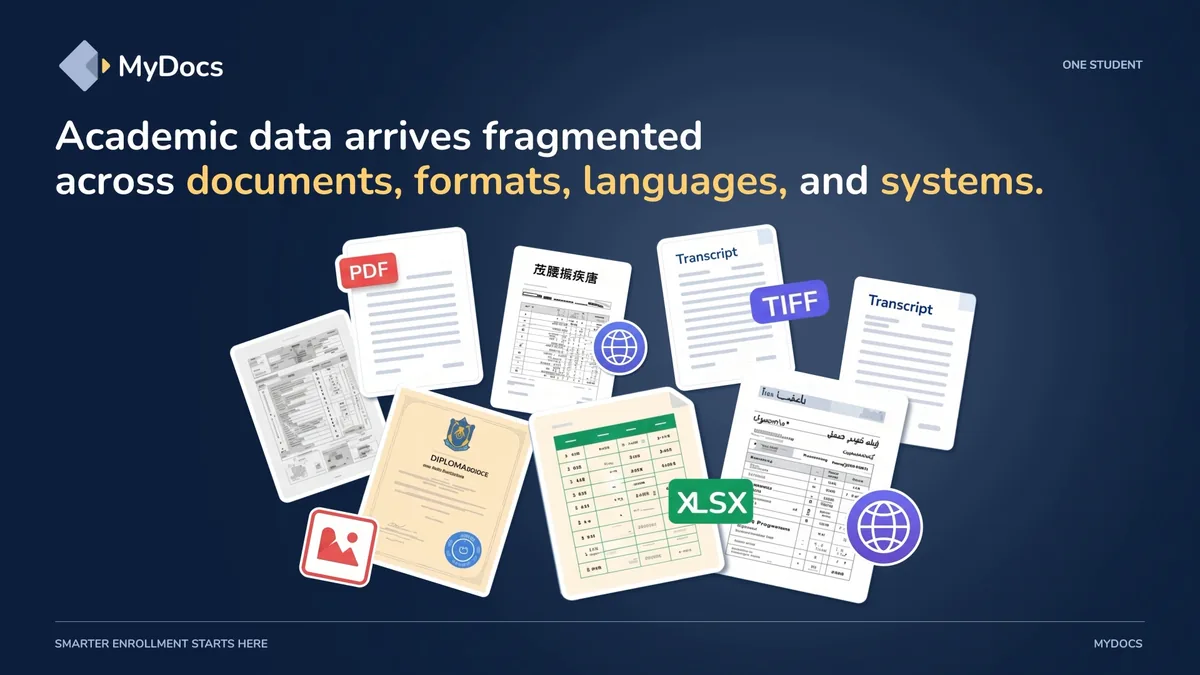
- "Academic data arrives fragmented across documents, formats, languages, and systems." Transcripts, PDFs, scanned records, spreadsheets, and documents in several languages fan out across the frame.
- 0:08
- "One student. Disparate data. No single academic story." A student icon sits at the center, connected to four sources: high school transcripts and academic history, prior-institution coursework and transfer credit, application and self-reported information from a CRM, and institutional academic data from an SIS.
- 0:14
- "What if it became one structured academic profile?" A single MyDocs Academic Profile document rises into view.
- 0:20
- Title card: "Smarter Enrollment Starts Here. Turn transcripts into standardized, usable academic data."
- 0:25
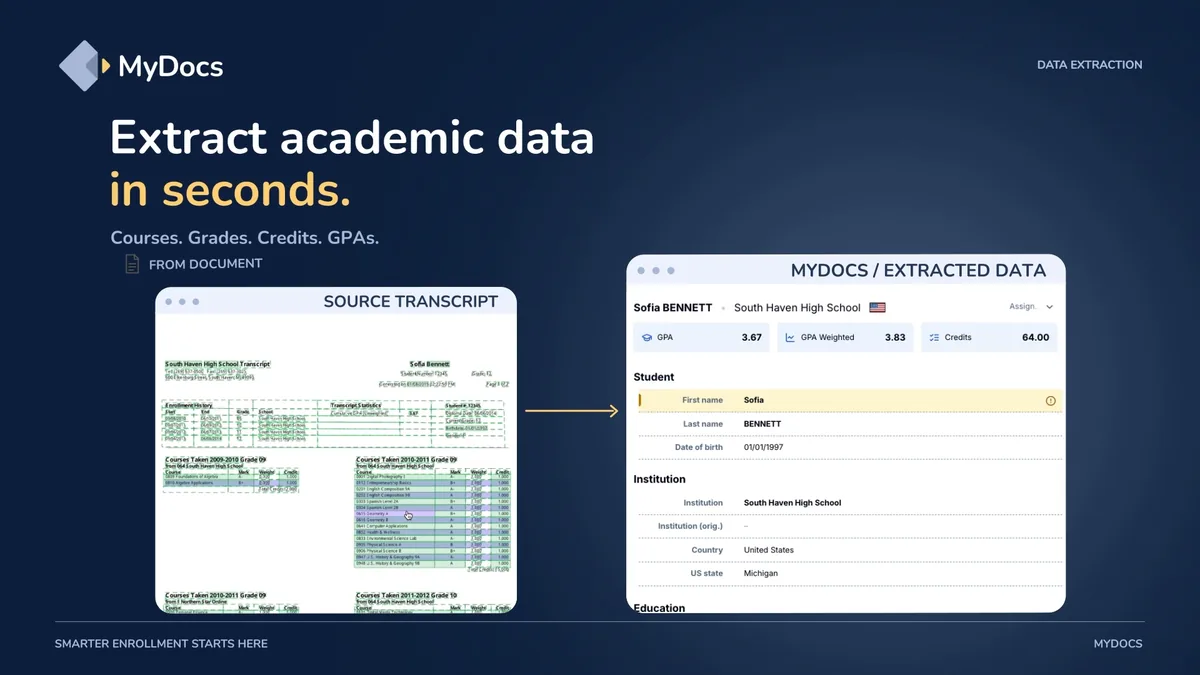
- "Extract academic data in seconds. Courses. Grades. Credits. GPAs." A source transcript sits beside the extracted MyDocs record as the fields populate.
- 0:34
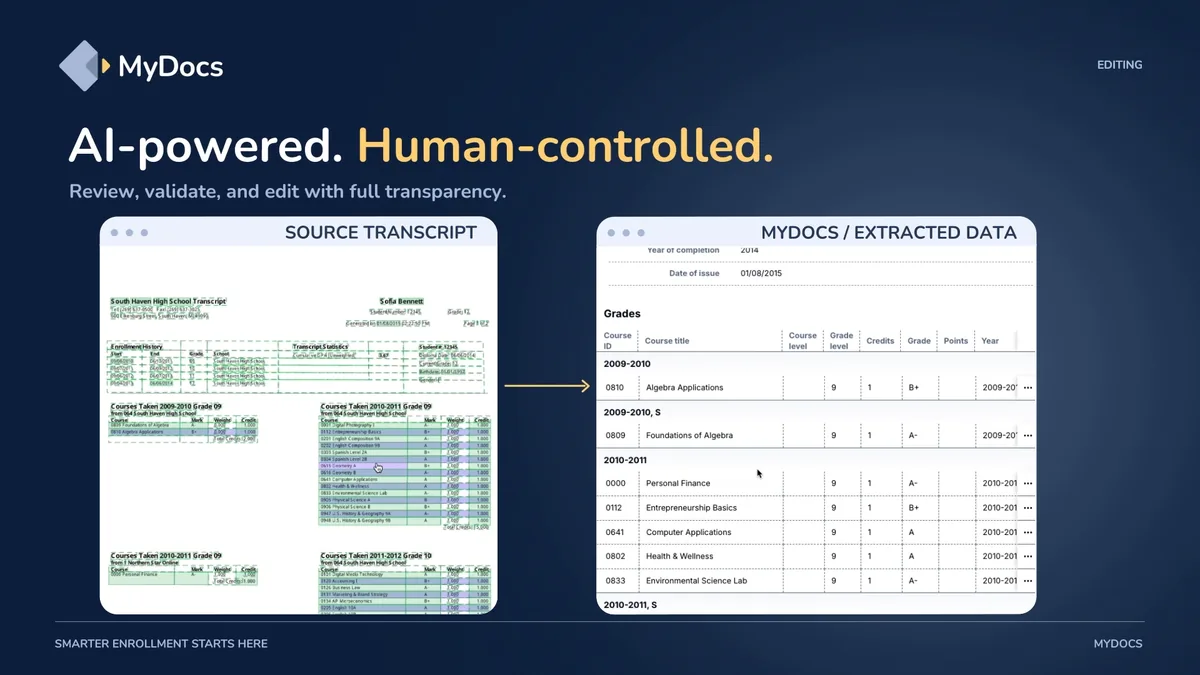
- "AI-powered. Human-controlled. Review, validate, and edit with full transparency." The source document and the editable extracted course data are shown side by side.
- 0:41
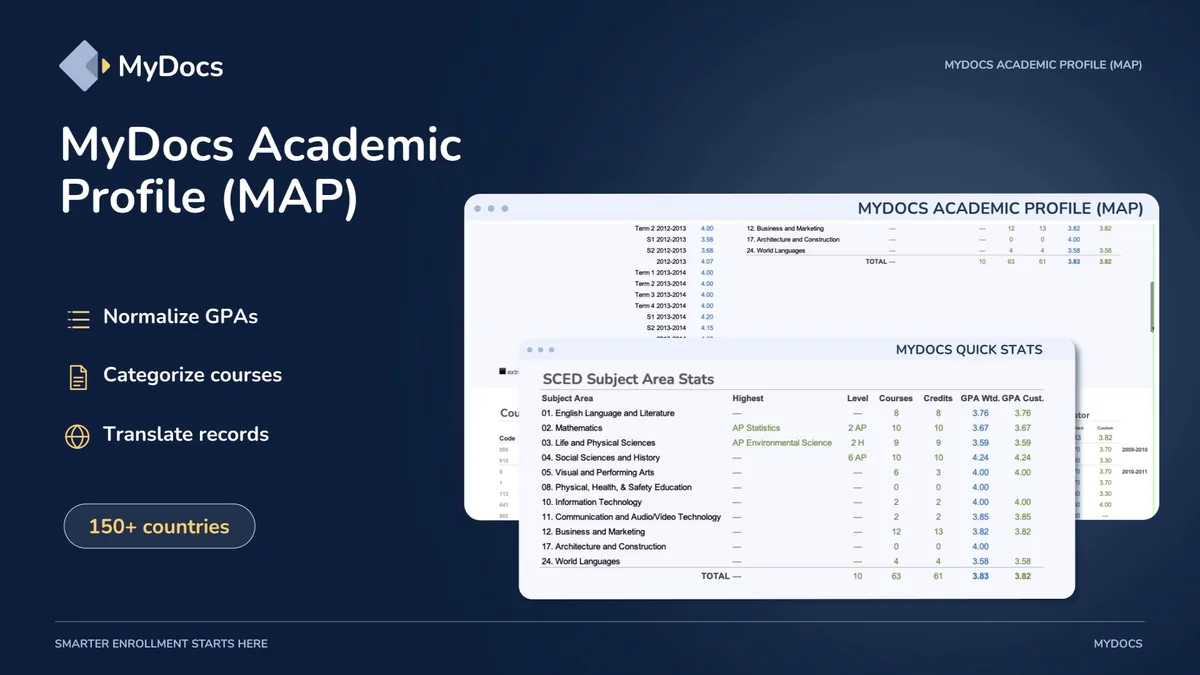
- "MyDocs Academic Profile (MAP). Normalize GPAs. Categorize courses. Translate records." The profile scrolls through per-term GPA figures and subject-area statistics.
- 0:50
- "A smarter front door for enrollment. Give students a reason to engage while gaining the academic context to identify opportunities, support direct admission, and personalize what happens next." Three steps follow: a student uploads a transcript before applying, FirstLook structures the data into a standardized academic profile, and the institution puts that insight to work in outreach and pathways.
- 1:01
- "Give transfer students answers earlier. Show how credits may apply using your institution’s rules and course equivalencies." Three steps follow: map courses to the curriculum, review and approve the mappings, and share transfer insight with the student.
- 1:13
- "One academic data foundation. Directly into your CRM / SIS. For every student population." Four icons appear for first-year, transfer, graduate, and international students.
- 1:20
- "Built for real admissions workflows." A customer quote from a university admissions leader appears with a portrait and an institution mark.
- 1:29
- A customer result figure and a second quote from a college enrollment leader appear, again with a portrait and an institution mark.
- 1:38
- "Trusted across higher education to transform how academic data moves." A row of institution logos fills the frame.
- 1:45
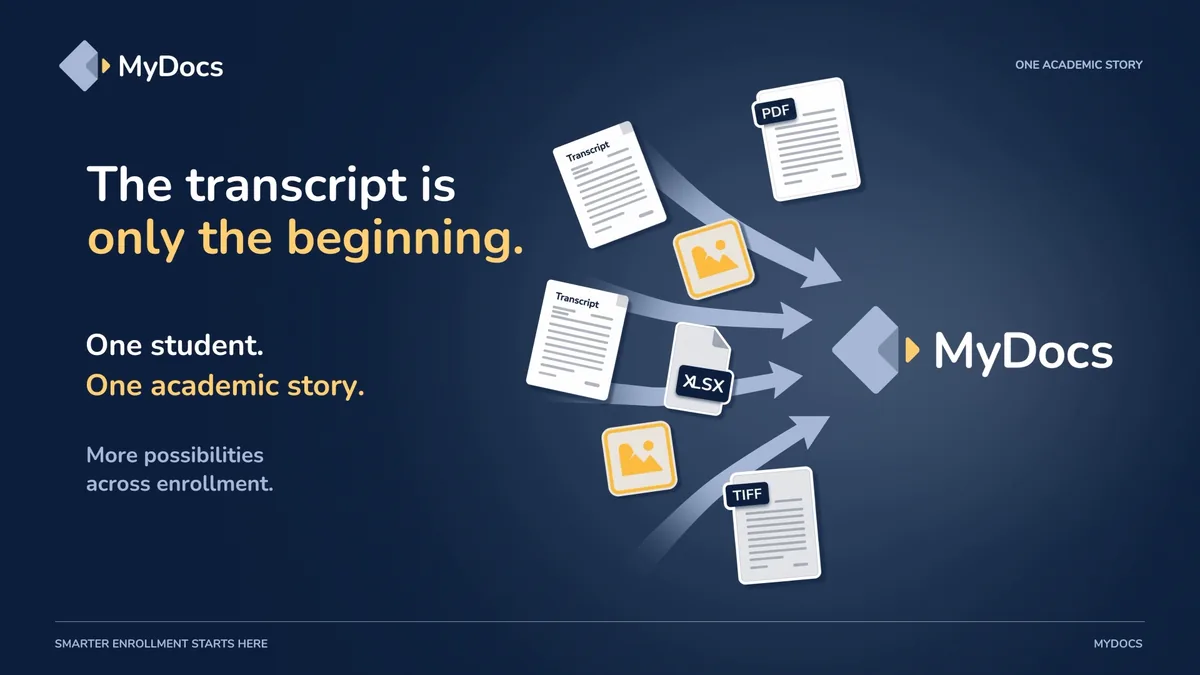
- "The transcript is only the beginning. One student. One academic story. More possibilities across enrollment." Documents flow back together into the MyDocs mark.
- 1:53
- Closing card: "Smarter Enrollment Starts Here. See MyDocs in action. mydocs.global." The frame settles back toward the opening image so the restart is not visible.
Project snapshot
What was made, and what it had to do
- Client
- MyDocs, a higher-education technology company
- Industry
- Higher education technology and B2B SaaS
- Deliverable
- Silent-first conference loop plus an audio-enabled version
- Runtime
- 2:02 (final delivered cut)
- Format
- 16:9, 1080p MP4, tested to loop cleanly
- Primary use
- Continuous display on an exhibit booth screen
- Production
- No filming and no live-action footage
- Services
- Creative direction, storyboarding, messaging refinement, graphic design, dashboard screen-recording integration, custom motion graphics, 2D animation, editing, sound design, export and loop testing
The challenge
How do you explain a complex platform in a high-distraction room?
A conference video has seconds, not minutes. On an exhibit floor the viewer is walking, the hall is loud, the screen is competing with every other screen in the aisle, and nobody arrives at the start. Whatever the video is going to say has to survive all of that.
MyDocs had a second problem on top of the room. Its platform turns fragmented academic records into standardized, usable data for admissions and enrollment teams, and the fragmentation is the whole point. Many documents, formats, languages, and systems had to become one clear story without flattening the product into a slogan. That is the same translation problem behind our trade show video production and product video production work.
What the exhibit floor takes away
- Quiet
- Undivided attention
- A controlled starting point
- Usable audio
- More than a few seconds
- A viewer who is standing still
What the video had to do anyway
- Read from several feet away
- Make sense from any entry point
- Explain a multi-step workflow
- Show the real product
- Hold up on repeat viewings
- End on a reason to talk to someone
The strategy
Design for the glance, not the sit-down
The brief was not to make a short film that happens to loop. It was to make something that works the way booth attention actually works: partial, interrupted, and silent.
A silent conference loop is a short, repeatable video designed to communicate from a distance without depending on narration.
Write for distance, not for a screen on a desk
Large headlines, short lines, and high contrast, with the detail carried by the product itself rather than by paragraphs of on-screen copy.
Make every section self-contained
Someone who joins at 1:10 should still learn something complete. Each sequence states its own idea, shows its own proof, and resolves before the next one starts.
Pair movement with reading time
Enough motion to catch a passing eye, then enough stillness to actually read the line. Pacing was tuned against the longest sentence in each section.
Close on an invitation, then loop
The final card gives a next step and settles back toward the opening frame, so the restart reads as a continuation instead of a hard cut.
Product-led storytelling
Show the product, not just the promise
There is no live-action footage in this video, and no shoot was required to make it. Every frame was built from MyDocs dashboard screen recordings, supplied brand and customer assets, typography, graphic design, and custom motion-graphic sequences.
The client asked for the real product to stay central, with graphics framing the benefits and connecting the workflows. That balance became the guiding creative decision. The recordings and the motion design were treated as one visual system rather than a narrated software walkthrough with titles bolted on: the graphics set up each idea, crop and highlight the part of the interface that matters, and carry the viewer between workflows that would otherwise look unrelated.
The result is a single progression, repeated every two minutes:
- Fragmented inputs Documents, formats, languages, and systems that do not line up.
- Extraction and review Data pulled from the source record, then validated and corrected by a person.
- Standardized profile One structured academic profile assembled from the pieces.
- Earlier enrollment insight Transfer credit, student potential, and pool quality visible sooner.
- Clearer next steps Insight moving into the CRM and SIS workflows a team already uses.
Scope of the story
What the video needed to communicate
Six ideas had to land inside two minutes, each one complete on its own so a viewer joining midway still took something away. The project focused on the following areas of the MyDocs platform and workflow.
Data extraction
Courses, grades, credits, and GPAs pulled from a source transcript and shown populating the record.
Human-controlled review
AI-assisted extraction presented alongside the editing view, with a person validating and correcting the result.
MyDocs Academic Profile
The standardized profile (MAP): normalized GPAs, categorized coursework, and translated records.
FirstLook
A pre-application path where a student uploads a transcript and the institution gains academic context earlier.
Transfer insight
Course mapping, review and approval of equivalencies, and a transfer picture shared back with the student.
Populations and systems
First-year, transfer, graduate, and international students, with the output landing in CRM and SIS workflows.
Credibility
Building trust inside a two-minute runtime
Product demonstration alone does not answer the question a booth visitor is actually asking, which is whether institutions like theirs already rely on this. Two short sequences late in the loop carry customer proof supplied and approved by MyDocs: quotes from admissions and enrollment leaders, shown with their institutions, followed by a wall of institution marks. Those names, portraits, and figures belong to MyDocs and its customers, so they are described here rather than republished.
The design job was to make that proof readable at a glance and consistent with everything around it. The logo tiles were rebuilt on solid white during review, because the shaded versions looked washed out on a bright exhibit display. The loop then closes on a human-centered graphic sequence that returns to the single student from the opening, so the last thing on screen is the point of the product rather than a feature list.
Outcome
Delivered, displayed, approved, and reused
The silent cut was prioritized for the conference and ran on the MyDocs booth display. The client confirmed it was working in the booth and approved the finished piece. A sound-designed version was then completed so the same story could keep working after the show.
- Delivered on schedule as a 1080p 16:9 MP4, tested to loop cleanly.
- Displayed on the MyDocs booth screen at the conference.
- Approved by the client at the end of the review process.
- Extended into an audio-enabled version with music and sound design for use after the event.
Event performance metrics were not available, so this case study focuses on the creative problem, the production decisions, and the delivered experience rather than booth traffic or pipeline.
FAQ
Conference and trade show video questions
A conference loop video is a short, repeatable video built to play continuously on a booth display. Viewers arrive partway through, so it has no real beginning or end and every sequence has to make sense on its own. The MyDocs loop runs 2:02 in 16:9 at 1080p and settles back toward its opening frame so the restart is not visible.
Exhibit halls are loud, and most booth screens are not set up for audio that a passerby could hear anyway. A sound-off design puts the message in on-screen copy, typographic hierarchy, and motion instead of narration. We built the MyDocs loop silent-first, then finished a separate audio-enabled version for use away from the show floor.
Long enough to tell a complete story, short enough to come back around while someone is still standing in front of the screen. The MyDocs loop lands at 2:02, built from sections of roughly five to nine seconds. The right length depends on how much a viewer has to understand before the closing invitation makes sense.
Show the product, and use design to frame it. For MyDocs we used real dashboard screen recordings as the proof and custom motion graphics to set up each benefit, direct attention to the right part of the interface, and connect one workflow to the next. The story moves from fragmented records to structured academic data to earlier enrollment insight.
Yes, when it is planned that way. The MyDocs loop was kept free of event-specific references so the file would still make sense off the show floor. An audio-enabled version with music and sound design was then finished for follow-up and online use.
Screen recordings of the product or access to record them, brand assets such as logo, typography, and color, any customer proof you are approved to show, and a clear point of view on what a viewer must understand. The MyDocs video required no filming at all: it was built from supplied brand assets, dashboard recordings, and original motion design.
About the client
About MyDocs
MyDocs is a higher-education technology company that turns domestic and international transcripts into structured academic data for admissions and enrollment teams. Its platform covers transcript extraction, human-controlled review, the MyDocs Academic Profile, FirstLook, and transfer-credit insight. You can read more on the MyDocs website, and about the event from the NACAC conference site.
Simplistic Views produces video for technology companies, including B2B video production, product videos, and event and conference content, working from a Chicago base.
Related work
More conference and product work
 Conference Content
EFJohnson ATLAS at IACP 2025
Turning a complex communications system into clear, technically credible short-form video around a national conference.
 Trade Show Content Strategy
ESPEC North America: Battery Show
How a few hours at a trade show became a library of thought-leadership video and months of content.
 3D Product Animation
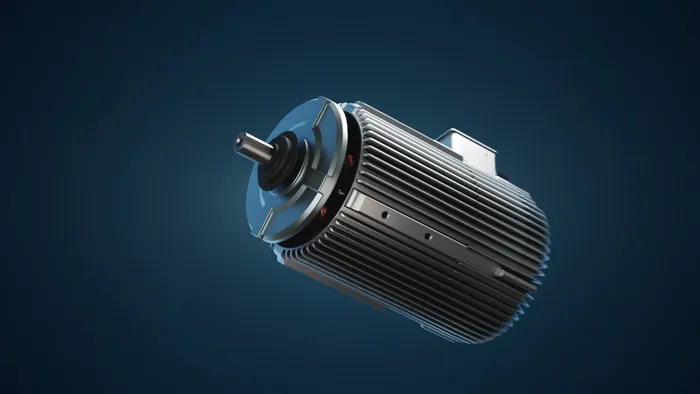
Regal Rexnord: LEESON SyMAX-PRO
Another product story told without a camera: engineering files turned into a polished industrial animation.
Need a conference video that makes a complex product clear at a glance?
Tell us what your booth has to explain and who is walking past it, and we will build the story your screen needs. Call or text 773-985-4899.